Splitwise Alternative: The Features That Actually Decide It

Every bill-splitting app can divide a dinner four ways. If that were the whole job, you would never have gone looking for an alternative in the first place.
The differences show up at the edges — the trip that happens in three currencies, the rent that has to be entered by hand every single month, the cab you need to log in a country where your SIM hasn’t woken up yet. That is where an app either holds up or quietly becomes a chore.
This guide covers the four features that decide it in practice, how the options compare, and how to switch without losing your history.
What people actually mean by “Splitwise alternative”
Read enough reviews and forum threads and the reasons cluster:
- “I hit a limit on how much I can add.” Free tiers increasingly cap how many expenses you can log, nudging you toward a subscription for something that used to be free.
- “It won’t work when I have no signal.” The moment you most need to log a spend — a cab abroad, a shop with no Wi-Fi — is exactly when a cloud-only app fails you.
- “The currency handling makes no sense.” Either everything is forced into one currency at whatever rate the app fancies, or the balances end up in a shape nobody can act on.
- “I’m still typing rent in by hand.” The most predictable expense in your life, re-entered manually, every month, forever.
- “I don’t want ads in a finance app.” Seeing an ad while you settle up with a friend feels wrong, because it means your attention is being monetised on top of your data.
1. Several currencies in one group
This is the one that breaks most tools. A trip does not politely happen in a single currency: the flights go on a card at home, one booking is charged in dollars, and everything on the ground is in the local money.
The right behaviour is to keep each spend in the currency it was actually paid in, and let the group hold all of them at once. Left alone, a real Vietnam group reads as three separate totals — ₹360,494, $1,260 and ₫19,367,500 — none of them invented. Tap Merge and it collapses into one figure. Tap Show All and the originals are back, untouched.
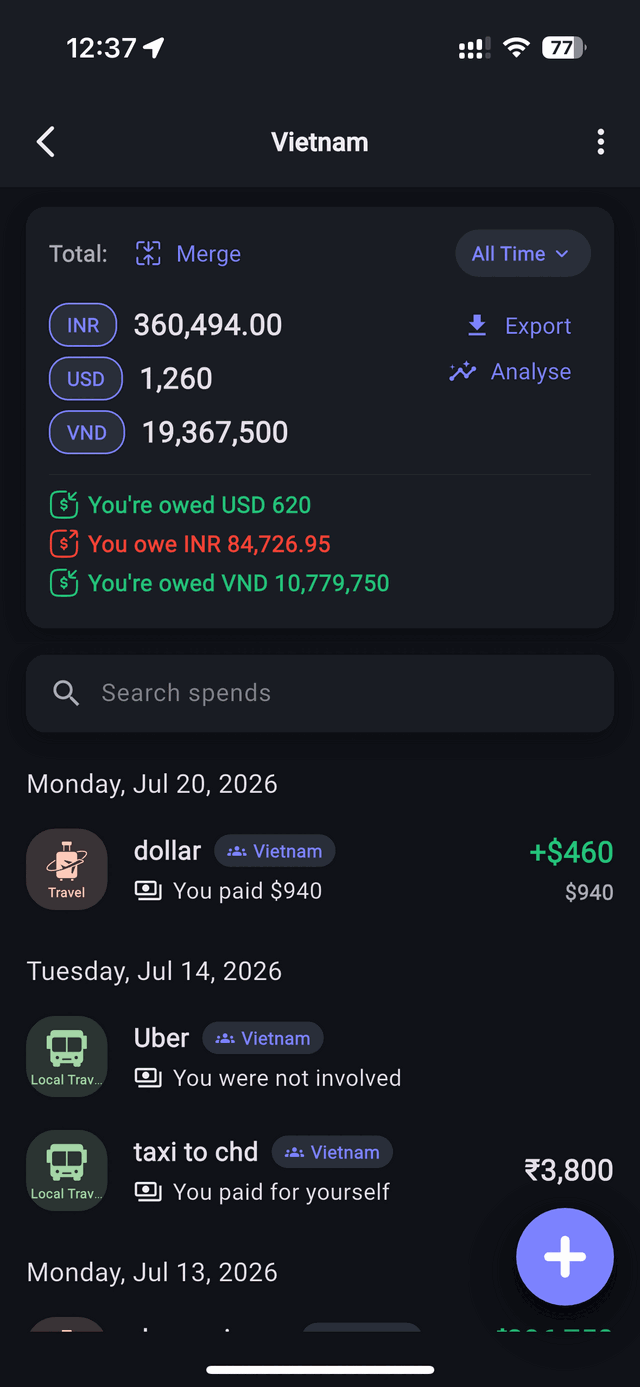
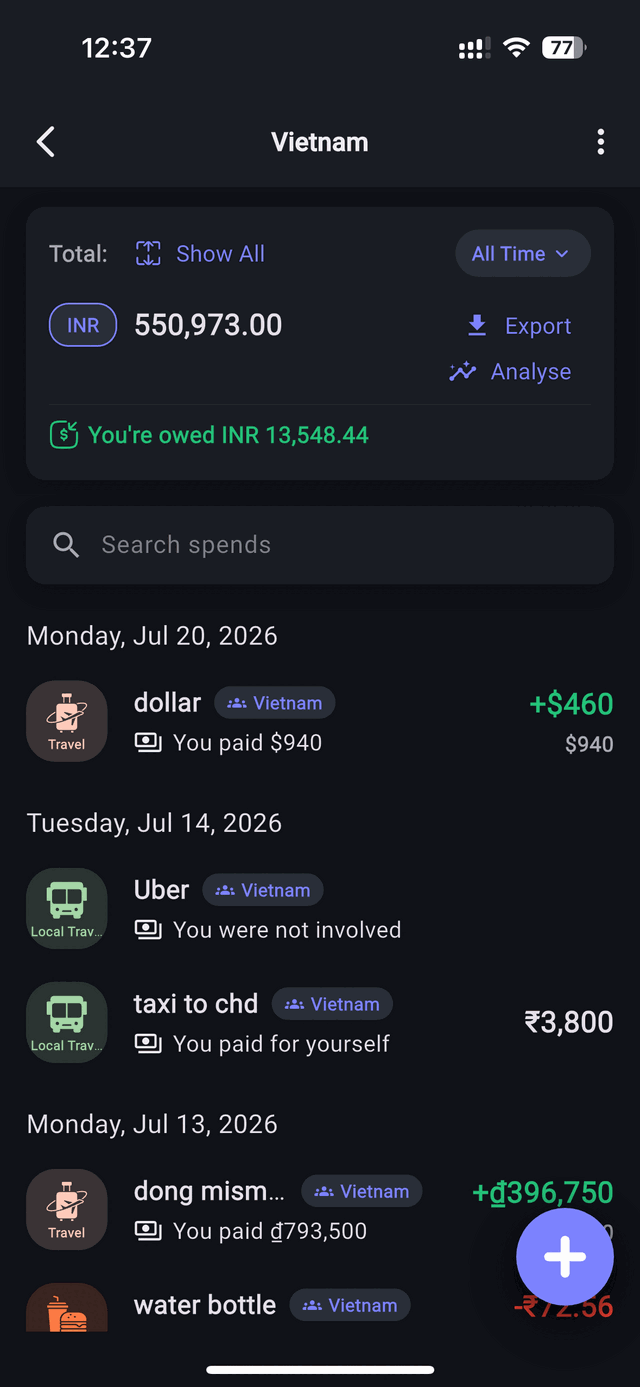
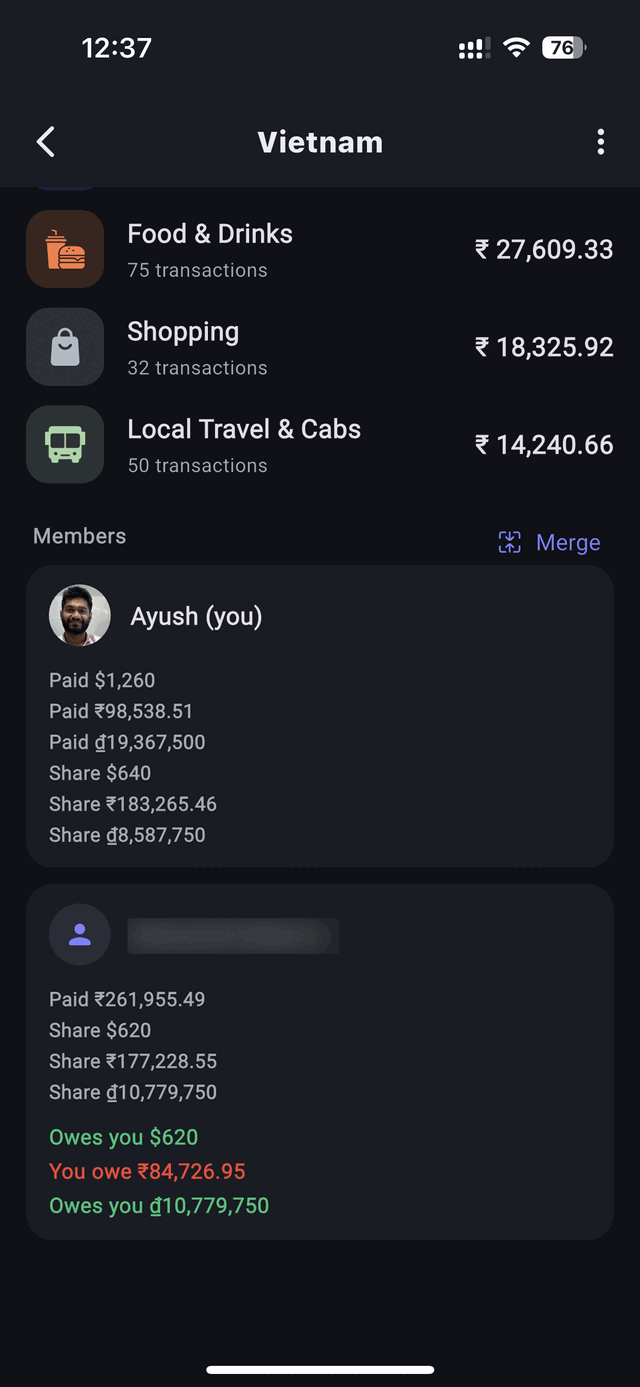
Balances work the same way. A single merged “you’re owed ₹13,548” tells you whether you are roughly even. Split by currency — owed $620, owing ₹84,726.95, owed ₫10,779,750 — tells you what to actually do: local cash tonight, a bank transfer when you’re home.
2. A converter built in — live rates, or a rate you set yourself
Plenty of apps have exactly one conversion policy and no way to override it. You want two, and it is worth checking before you commit to a tool.
Live rates are the sane default for casual splitting, when nobody wants to look anything up. A rate you set on the group is better the moment real money changed hands at a real rate — a cash exchange, an ATM withdrawal, a transfer with a known spread.
Here is why that distinction is worth a feature. On that trip we carried $2,000 in cash, bought at home for ₹190,479, and changed $740 of it into ₫19,367,500. Chain those and our dong cost ₹1 for every ₫275 — a rate we paid once and never paid again. Set the group to those numbers and the merged total isn’t an estimate: the leftover dollars come to ₹120,002, the dong to ₹70,477, together exactly the ₹190,479 that cash cost at the counter. Add ₹360,494 of card spending and the trip cost ₹550,973.
3. Recurring expenses that post themselves
Rent is the same amount, on the same day, split the same way, every month. There is no reason a human should be typing it in. Set it up once — amount, group, split, start date, monthly — and each month’s entry appears on the right day, already divided between the right people. Weekly and yearly work the same way, for a standing grocery run or an annual insurance bill.
Two behaviours worth checking in any app that claims this. A monthly schedule should hold its day of the month — one set for the 31st has to clamp for February and then return to the 31st, not permanently drift to the 28th. And a start date in the past should backfill: if you set the group up on the 5th but rent is a 1st-of-the-month thing, the occurrences you missed should be filled in rather than lost. There is more on the household side of this in splitting rent and utilities with roommates.
4. It works with no signal
Offline-first is not a nice-to-have on a trip; it is the difference between a habit that survives and one that dies on day two. You will be logging a cab with no bars, on a foreign SIM that hasn’t activated, right after landing. The entry should save instantly and sync later — not fail, and not wait for a spinner.
And the parts that never make a feature list
Worth stating plainly, because they still decide things for a lot of people:
- No ads. Nothing you log is used to target you.
- Your spending data isn’t sold or shared. A year of splits is a diary — where you eat, who you travel with, who you live with. It shouldn’t be anyone’s business model.
- Export to CSV whenever you want. It is your money history, so you should be able to walk out with it.
Split Money vs. Splitwise vs. Tricount vs. Settle Up
Here’s how the common options line up on the things people actually switch for.
| Split Money | Splitwise (free) | Tricount | Settle Up (free) | |
|---|---|---|---|---|
| Several currencies in one group | Yes | Yes | Yes | Yes |
| Merge them into one total | Yes | Pro only | Yes | Yes |
| Set your own conversion rate | Yes, per group | No | Yes | Yes |
| Recurring / scheduled expenses | Yes | Yes | Not offered | Premium |
| Works offline | Yes | Limited | Yes | Yes |
| Cap on expenses you can log | None | 3 per day | None | None |
| No ads | Yes | Ads on free tier | Yes | Ads on free tier |
| Even & custom splits | Yes | Yes | Yes | Yes |
| Export to CSV | Yes | Varies by tier | On request | Android only |
| Free to start | Yes | Yes | Yes | Yes |
Checked August 2026 against each app’s own documentation and help centre. Tiers and features move around constantly — treat this as a starting point and confirm anything you’re deciding on. Where a rival does something well, it says so above.
A few things worth reading out of that table rather than skimming past. Multi-currency is not the differentiator it used to be — Tricount and Settle Up both handle several currencies and both let you pin a rate manually, and Settle Up will hold one rate for a whole holiday. Splitwise is the outlier here: it keeps balances separate per currency and puts conversion behind Pro.
Where the free tiers actually diverge is what they hold back. Splitwise’s free plan caps you at three expenses a day, which a single travel day blows through before dinner. Settle Up keeps recurring transactions for Premium and shows ads in between. Tricount is genuinely free and ad-free, but has no recurring expenses at all, so rent is back to being typed in by hand.
Split Money’s position is simply that none of those four things — unlimited logging, multi-currency with your own rate, recurring schedules, and no ads — should be the thing you pay to unlock or give up.
What that looks like in one place
Track spending in seconds, split evenly or with custom amounts, group by household or trip, schedule the bills that repeat, keep every currency the trip actually used, and settle with a running “who owes what” that updates the moment anyone adds a spend.
For a wider field than these four, there is a five-app comparison covering Splid as well.
How to switch without losing your history
- Settle open balances first. Clear out anything outstanding in your current app so you start Split Money from a clean zero.
- Export your old data. Most tools let you download a CSV — keep it as your archive.
- Recreate your active groups. You usually only have one or two live at a time (a household, a current trip). Set those up and add your friends.
- Log forward, not backward. You don't need to re-enter years of history — just start tracking new spends. Old balances are already settled from step one.
Frequently asked questions
Can one group hold more than one currency?
Yes. Each spend keeps the currency it was paid in, the group shows a separate running total for each, and merging them into a single figure is a toggle rather than a decision you make when you create the group.
Can I choose the exchange rate?
Yes. Live rates are the default, and you can set a custom conversion rate on a group when real money changed hands at a known rate — a cash exchange, an ATM withdrawal, a transfer. Every merged total and balance in that group then uses your number.
Can rent be added automatically every month?
Yes — set a monthly schedule with the amount, group and split, and each month’s entry appears on the right day already divided between the right people. Weekly and yearly schedules work the same way.
Does it work without internet?
Yes. Split Money is offline-first: add spends with no signal and they sync automatically once you’re back online.
Does it handle uneven splits?
Yes — split evenly by default, or set custom amounts when a cost wasn’t shared equally. Spends someone wasn’t part of can be recorded without involving them at all.
Is Split Money free, and can I get my data out?
Free on both iOS and Android, with no ads. Export everything to CSV whenever you want.
Most bill splitters are interchangeable on the easy half of the job. Pick yours on the hard half — what happens when the trip crosses a border, when the bill repeats every month, and when you have no signal at the exact moment you need to log something.
Try it on the hard half of the job
Multi-currency groups, a rate you set yourself, recurring bills that post themselves, and logging that works with no signal.