Why I Built Split Money: A Google Sheet, a Trip to Vietnam, and an App

I didn’t set out to build an app. I just wanted to track what I was spending.
So I built myself the smallest possible version of that: a plain web page where I typed in an amount and a note, and it appended a row to a Google Sheet I owned. No categories, no charts, no login. Ugly, fast, and mine.
That was the whole project for a while. It did one thing, it did it in about four seconds, and if life hadn’t intervened it would probably still be a scrappy little page.
Then came the trip
A friend and I planned two weeks in Vietnam. Shared cabs, shared meals, shared everything — the normal texture of travelling with someone. I assumed the hard part would be splitting: who paid, who owes, how do we settle. That part turned out to be easy.
The hard part was that the trip happened in three currencies at once.
The flights went on an Indian card, in rupees, weeks before we left. One booking was charged in dollars. And then everything that actually happened on the ground — the taxis, the pho, the boat tickets, the hotel in Hoi An — happened in Vietnamese dong, in numbers with so many zeroes that you stop reading them properly by day three.
Every splitting app I tried had the same shape of answer: pick one currency for the group, and convert everything into it as you type. Which sounds reasonable right up until you try it.
The bit that actually broke
Here is what our money actually did, because the exact numbers are the whole argument.
- We left India with $2,000 in cash, bought at home for ₹190,479 — ₹95.24 to the dollar, paid once, done.
- In Vietnam we changed $740 of it into ₫19,367,500. That is every dong this trip ever spent.
- One package was paid in cash, $360, straight out of the same envelope.
- Everything else went on an Indian card, in rupees.
Follow the chain and our real exchange rate falls out of it: $740 cost us ₹70,477, and it bought ₫19,367,500. So our dong cost ₹1 for every ₫275.
No converter will ever show you that number. It isn’t a market rate — it is two counter spreads, one in India and one in Vietnam, welded onto whatever the mid-market happened to be on those two particular mornings. And it is the only rate that describes what this trip cost us.
We bought our dong once, at one rate, and then spent them over fourteen days. The rate never changed. Only the internet’s opinion of it did.
That is exactly what an app that converts as you type gets wrong. It reaches for today’s live rate at the moment you log the spend — a rate that drifts while you are still spending money you already bought, and that was never yours in the first place. A ₫60,000 bowl of pho in week one ends up recorded at a different cost from the identical bowl in week three, for no reason connected to anything either of us did. Multiply that by a hundred small entries and the totals stop meaning anything. Worse, they stop agreeing — my phone’s idea of what we’d spent and my friend’s drifted apart, and nobody enjoys a balance sheet that doesn’t match.
The workaround people reach for is a group per currency: a rupee group, a dollar group, a dong group. We tried it for a day. It is tidy and it is useless, because it can’t answer the only question that matters at the end of a trip — what do we owe each other, in total?
So I added it to my own tool
Instead of picking one of those apps, I added splitting to the scrappy page, and I built it around one rule: store what was actually paid, in the currency it was actually paid in. Convert later, once, in a place you control.
Four things fell out of that rule, and they’re still the shape of the app today.
1. Every spend keeps its own currency
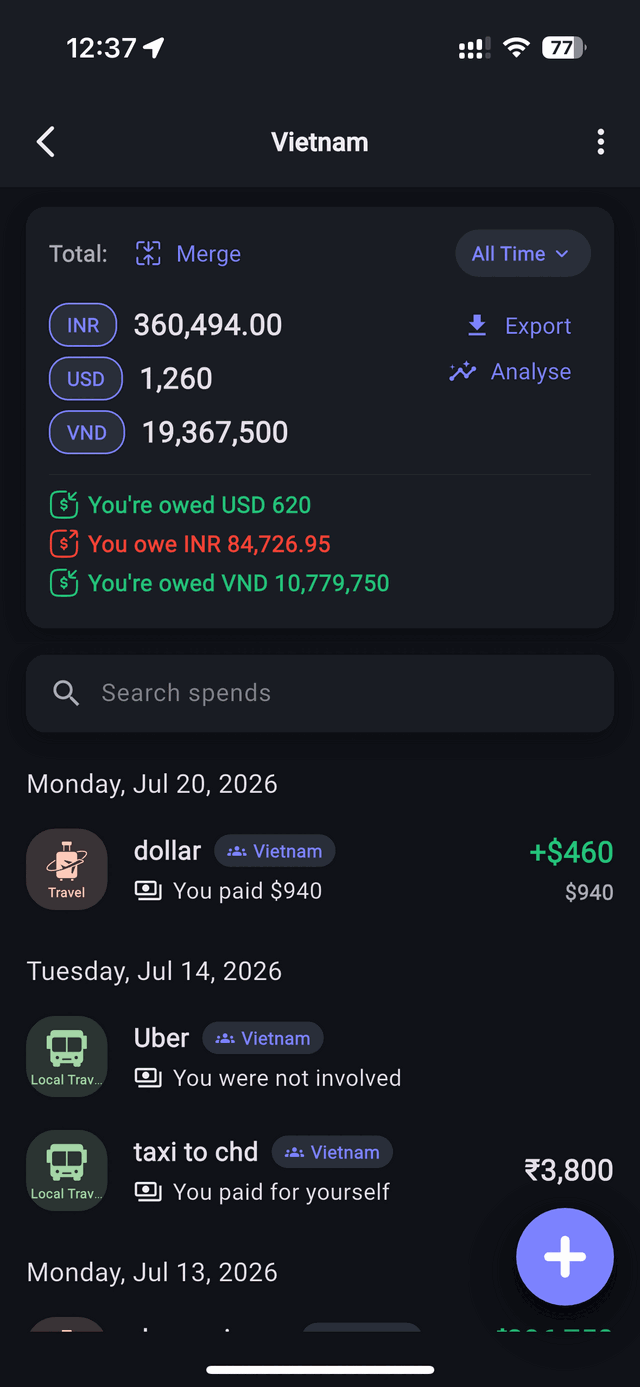
₫793,500 is logged as ₫793,500. $940 is logged as $940. ₹3,800 is logged as ₹3,800. The entry matches the receipt, forever, and no exchange rate is baked into it at the moment of typing. Everything else in the list below is only possible because of this one decision.
2. The group total works both ways
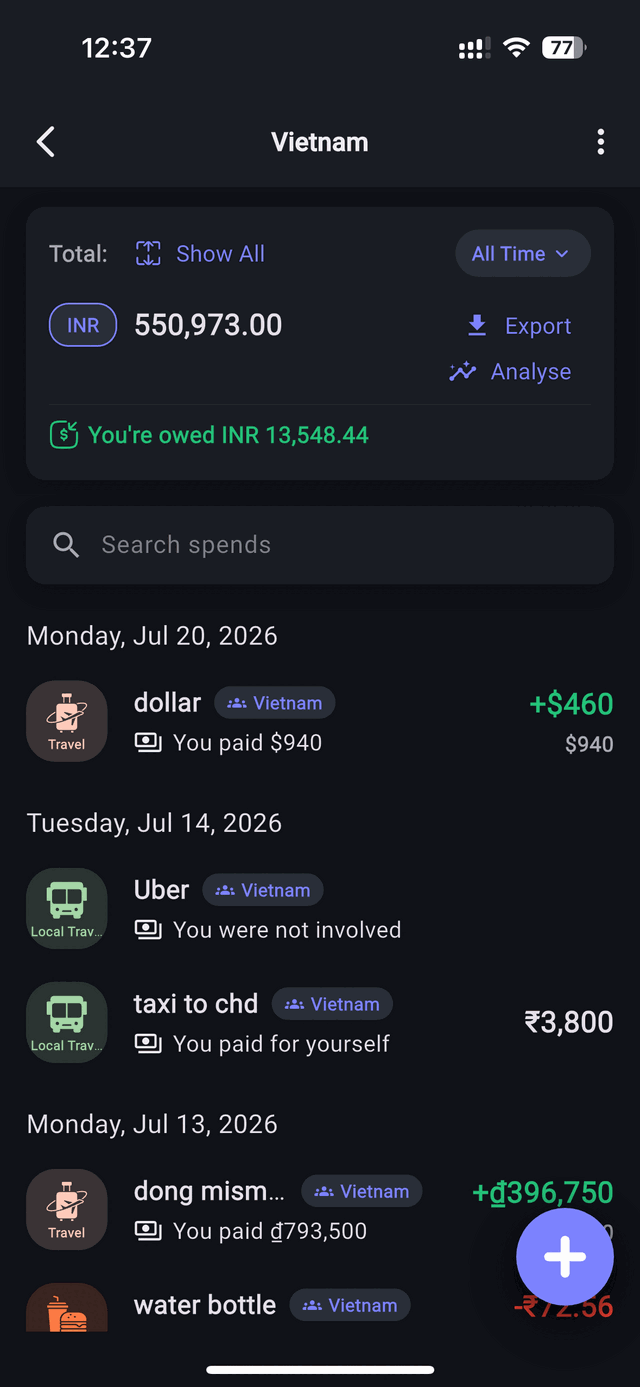
A group holds all of its currencies side by side. Left alone, our Vietnam group reads as three real numbers — ₹360,494, $1,260 and ₫19,367,500 — none of them invented. The $1,260 is simply what was left of the cash envelope after $740 of it became dong. Tap Merge and the same group collapses into one figure, ₹550,973, converted at the rate you chose. Tap Show All and the three originals are back.
3. Balances stay split too
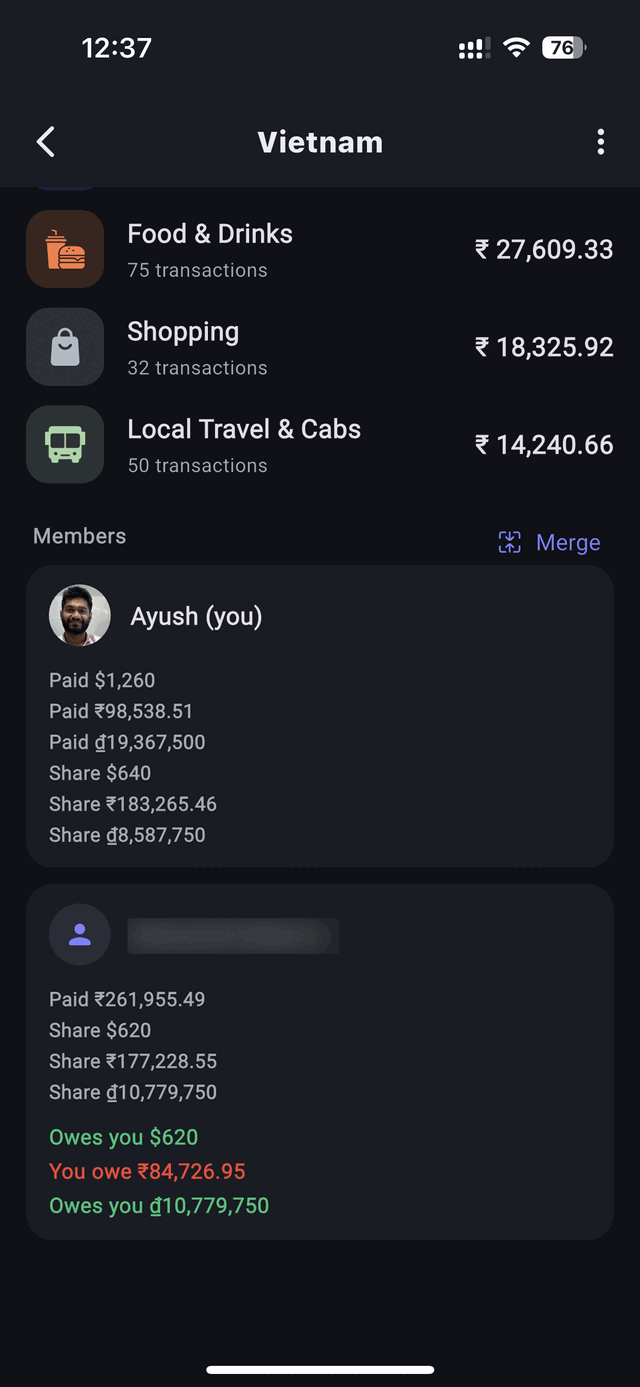
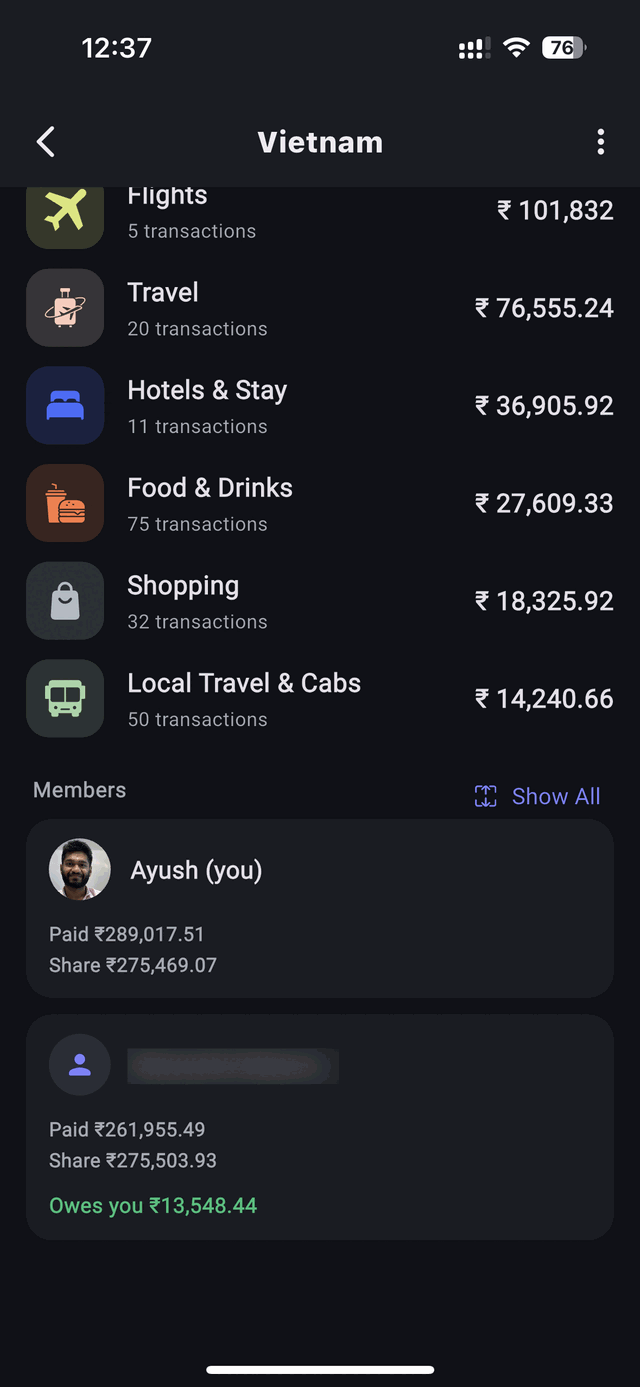
This is the part I didn’t expect to matter as much as it does. A single merged “you’re owed ₹13,548” is a fine summary and a useless instruction. Split the same balance by currency and you get something you can act on:
- You’re owed $620
- You owe ₹84,726.95
- You’re owed ₫10,779,750
Same friend, same trip, same net position — but now it tells you what to do. Hand over the dong in cash at dinner. Settle the rupees by bank transfer once you’re home. Leave the dollars alone, because you’re both travelling again in a month anyway.
4. You can set the rate yourself
Live rates are the sensible default — nobody has to look anything up, and for a weekend across a border they’re all you need. But when real money changed hands at a real rate, that rate is the truth of the trip. So a conversion rate can be set on the group itself, and every merged total and balance in it uses the number your group agreed on.
Watch what that does to our numbers. Set the group to the rates we actually paid — ₹95.24 to the dollar, ₫275 to the rupee — and the leftover $1,260 comes to ₹120,002, the ₫19,367,500 comes to ₹70,477, and together they are ₹190,479. Which is, to the rupee, exactly what we handed over in India for that cash in the first place. Add the ₹360,494 that went on the card and the merged total is ₹550,973.
That figure isn’t an approximation of what the trip cost. At our own rate, it is what the trip cost.
We used all of this for the rest of the trip — logging tuk-tuks and pho and boat tickets as we went, settling before we flew home. It worked. Somewhere in that fortnight the scrappy page stopped feeling like a hack and started feeling like something other people might actually want.
What it turned into
Split Money is that tool, grown up. Track spending, split evenly or with custom amounts, organise by group for roommates or trips, see what a trip cost by category and by person, and settle up when you’re ready — with as many currencies in a group as the trip actually had.
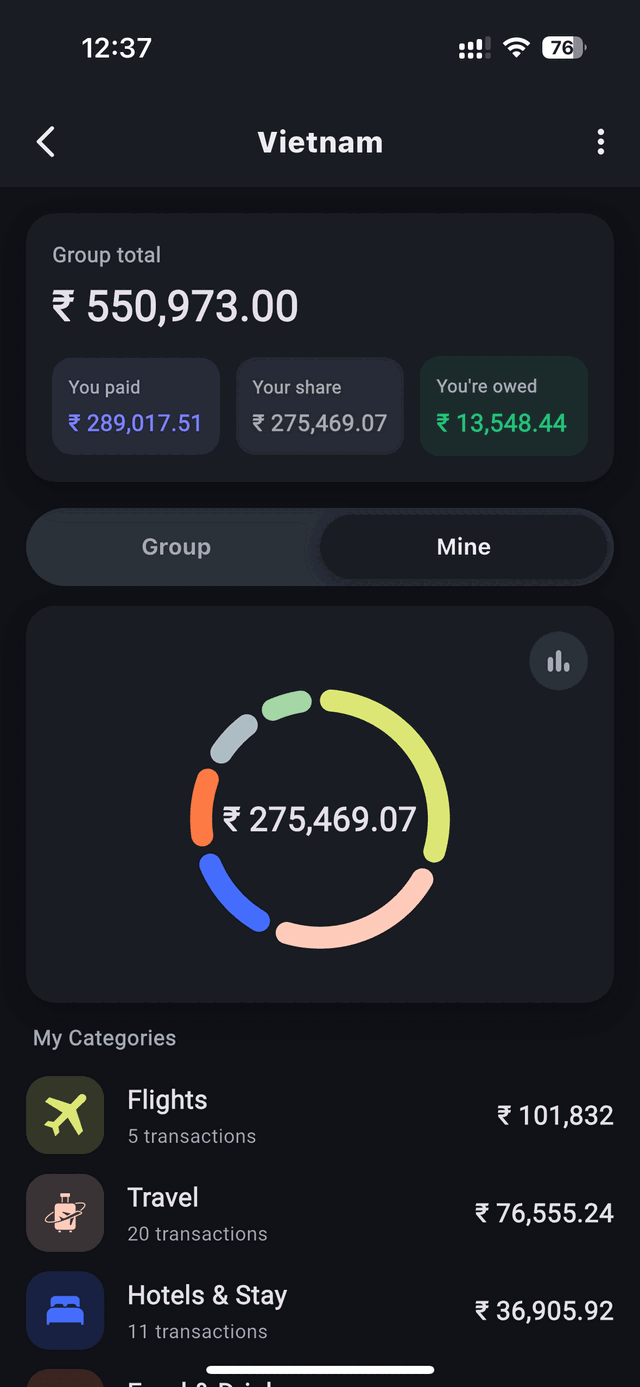
It works offline, because logging a cab shouldn’t depend on a signal you don’t have in a country you just landed in. There are no ads and nothing is sold. Your data stays yours — export everything to CSV whenever you want.
The principles that survived
A lot changed between that Google Sheet and the app on your phone. A few things deliberately didn’t:
- Record what happened, not an interpretation of it. The amount you paid, in the currency you paid it in. Conversion is a view, and views can be changed; records shouldn’t be.
- It works without a signal. Offline-first isn’t a feature bullet — it’s the reason the original tool existed on my terms rather than a server’s.
- Your data is yours. No ads, no selling, no “anonymised” data deals, and a CSV export whenever you want one.
- Simple beats clever. The original was ugly but fast. The app should still be something you open, log a spend into, and close in a few seconds.
If you’re about to travel with friends
The short version of everything above, for your next trip:
- Agree on one shared group before you leave, not five chat threads during.
- Whoever pays, logs it — then and there, in the local currency, converting nothing.
- Default to an even split; customise only when a cost genuinely wasn’t everyone’s.
- If you changed cash at a known rate, set that rate on the group.
- Settle on the last night, while everyone is still in the same room and in a good mood.
There’s a longer, more practical version of this in how to split expenses in multiple currencies, if you want the full system rather than the origin story.
Frequently asked questions
Why not just convert everything to one currency as you go?
Because you never paid those rates. Converting at entry permanently bakes a one-off, arbitrary rate into each record, so identical purchases end up costing different amounts and two people’s totals drift apart. Store the original amount and convert at the point of display instead.
How many currencies can one group hold?
As many as the trip had. Each spend carries its own, the group total lists them separately, and merging into a single figure is a toggle rather than a setup decision you’re stuck with.
Live exchange rates or a rate I set myself?
Live rates by default. Set your own on the group when real money changed hands at a known rate — a cash exchange, an ATM withdrawal, a card statement — because that is what the trip actually cost you.
Does it work with no internet abroad?
Yes. Spends are added offline and sync when you’re back on a connection, which is exactly what you need in the first few days of a trip with a SIM that hasn’t woken up.
Is Split Money free?
Yes, on both iOS and Android, with no ads and nothing sold on. You can export your data to CSV at any time.
Built on a trip, for trips
Log every spend in the currency you paid it in, merge into one total when you want it, and settle in whichever money makes sense.